0 ratings

Artigo n.º:
43698670
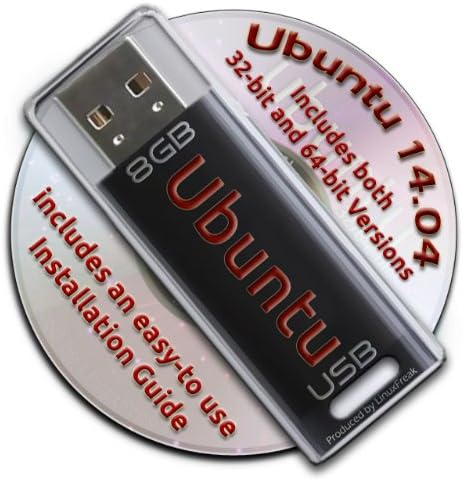
Ubuntu Linux 14.04 Bootable 8GB USB Flash Drive - Contains Both 32-bit and 64-bit.
Artigo n.º:
43698670
MZN 3198
Price Details
Excluding Shipping & Custom charges ( Shipping and custom charges will be calculated on checkout )
*All items will import from EUA
0 ratings
Escreva um comentário
Em estoque
 Importado da loja USA
QTY:
Encomende já e receba por volta de Terça-feira, Julho 07
Secured transaction
Ubuy works hard to protect your security and privacy. Our advanced payment security system ensures confidentiality by encrypting your information during transmission using AES (Advanced Encryption Standards) and SSL (Secure Socket Layer) protocols. Your payment details are 100% secure as we do not share your payment details with third party sellers.
Os nossos principais Parceiros Logísticos


Now you can take your Ubuntu installation with you anywhere, and always have your own O/S on any PC you use!

Fast
Shipping

Devolução
gratuita*

Embalagem Segura

Produtos 100% Originais

Certificação PCI DSS

Certificação ISO 27001


Note: Step Down Voltage Transformer required for using electronics products of EUA store (110-120). Recommended power converters Compre Agora.


O que se Destaca
Dual Architecture
Includes both 32-bit and 64-bit versions, ensuring compatibility with a wide range of hardware setups, making it a versatile choice for all users.
Bootable Ready
Preloaded with Ubuntu 14.04, the USB drive is ready to boot immediately, offering a hassle-free setup to users wanting to experiment or install Linux.
Portable Convenience
The compact 8GB size makes it easy to carry, allowing users to have Ubuntu on-the-go, ideal for troubleshooting or secure computing on any compatible machine.
Detalhes do produto
| Item Weight | 0.2 lbs (90 grams) |
Quem Deverá Comprar?

-
Linux Beginners
Ideal for users new to Linux wanting an easy installation process without needing additional technical skills.
-
Portable OS Users
Great for those needing a lightweight operating system that can be run from USB on multiple computers.
-
System Recovery
Useful for users wanting to troubleshoot or recover data from a non-booting computer using a live USB.

-
Windows Users
Not suitable for users who primarily use Windows and have no interest in transitioning to a Linux environment.
-
Old Hardware
Older computers may struggle to run Ubuntu 14.04 efficiently, which could lead to a poor user experience.
-
Latest Software Needs
Users requiring the latest software updates and features may find the 14.04 version outdated for contemporary requirements.
DESCRIÇÃO DO PRODUTO
Ubuntu Linux 14.04 Bootable 8GB USB Flash Drive - Contains Both 32-bit and 64-bit.
Tem alguma Dúvida? Converse connosco
Perguntas e Respostas dos Clientes
-
pergunta:
What is included on the Ubuntu Linux 14.04 Bootable USB Flash Drive?
Resposta: The Ubuntu Linux 14.04 Bootable USB Flash Drive comes pre-loaded with both the 32-bit and 64-bit versions of the Ubuntu operating system. This gives users the flexibility to choose the version that best fits their hardware capabilities. Additionally, the USB drive is formatted to be bootable, allowing for straightforward installation on compatible devices without the need for additional setup. Whether you're revamping an older computer or setting up a new system, this USB drive is a practical solution. -
pergunta:
How do I create a bootable USB drive with Ubuntu Linux 14.04?
Resposta: Creating a bootable USB drive with Ubuntu Linux 14.04 is a straightforward process. Simply plug the USB drive into your computer, and during the boot-up sequence, access the BIOS or boot menu. From there, you’ll select the USB drive as the boot device. The USB contains installation files that will lead you through the setup process. This method is efficient for installing Ubuntu on various machines quickly, so it's especially useful for system administrators or users managing multiple installations. -
pergunta:
Is Ubuntu Linux 14.04 suitable for older hardware?
Resposta: Yes, Ubuntu Linux 14.04 is particularly suitable for older hardware. Its lightweight design allows it to run smoothly on systems with lower specifications, making it an excellent choice for revitalizing older computers. Unlike some modern operating systems that require more resources, Ubuntu 14.04 can comfortably operate on machines with limited RAM and processing power, thereby extending the useful life of older devices. -
pergunta:
What are the key features of Ubuntu Linux 14.04?
Resposta: Ubuntu Linux 14.04 offers a rich set of features, including a user-friendly interface, improved performance, and robust security enhancements. The long-term support (LTS) status of this version means that it receives essential updates and support for an extended period. Features like the Unity desktop environment, compatibility with a wide range of hardware, and a vast repository of software applications greatly enhance user experience. This makes it ideal for both personal and professional use. -
pergunta:
Can I use this USB drive for persistent storage?
Resposta: Yes, you can utilize the Ubuntu Linux 14.04 Bootable USB Flash Drive for persistent storage, allowing you to save files and settings between sessions. Persistent storage enables you to keep installed applications and personal files, making the USB drive a flexible, portable solution for running Ubuntu. This is especially handy for individuals who need a reliable operating system on the go, whether for work or study. -
pergunta:
What should I do if I encounter issues booting from the USB drive?
Resposta: If you experience issues booting from the USB drive, first ensure that your computer is set to boot from USB in the BIOS settings. Double-check the connection and try using a different USB port if necessary. If the problem persists, the USB may need to be reformatted as a bootable drive again. Refer to the installation instructions that come with the USB or visit official Ubuntu documentation for troubleshooting tips to resolve common boot-related challenges. -
pergunta:
Is Ubuntu Linux 14.04 safe to use?
Resposta: Yes, Ubuntu Linux 14.04 is considered safe to use. The operating system is built with security in mind, featuring a robust permissions system and firewall. Regular security updates from the Ubuntu community help to protect users from vulnerabilities. Additionally, being open-source allows its code to be scrutinized by developers around the world, contributing to a more secure environment. This makes it a reliable choice for users who prioritize security in their computing activities. -
pergunta:
Can I run this Ubuntu version on a virtual machine?
Resposta: Absolutely! You can run Ubuntu Linux 14.04 on a virtual machine by using virtualization software such as VirtualBox or VMware. Simply create a new virtual machine, allocate resources such as RAM and disk space, and choose the USB drive as the boot medium. This is particularly useful for developers or testers who need to experiment with different operating systems without altering their main system. -
pergunta:
What are the system requirements for Ubuntu Linux 14.04?
Resposta: The system requirements for Ubuntu Linux 14.04 are quite modest, which is one reason for its popularity among users with older hardware. You need at least a 1 GHz processor, 1 GB of RAM, and around 5 GB of free disk space. However, for optimal performance, especially with the graphical interface, it is recommended to have 2 GB of RAM. This makes it accessible for a wide range of computers, from older desktops to newer laptops. -
pergunta:
Where can I buy Ubuntu Linux 14.04 Bootable 8GB USB Flash Drive?
Resposta: You can buy the Ubuntu Linux 14.04 Bootable 8GB USB Flash Drive from Ubuy in Mozambique. Ubuy provides a convenient platform for ordering tech products, ensuring that you receive a reliable and usable bootable drive directly to your location. This makes it easier for customers looking to upgrade their systems or try out Ubuntu for the first time.
LinuxFreak USB Flash Drives Editorial Review
The Ubuntu Linux 14.04 Bootable 8GB USB Flash Drive contains a 32-bit and 64-bit Ubuntu system in a bootable format. The USB flash drive is the device that delivers the OS. You can boot up Ubuntu and try it without installation or install it on your hard drive. Do note, any changes made while using the OS will be lost when you shut down. So, when installing, users must partition their hard drive or risk overwriting their current operating system. However, it seems Ubuntu doesn't work on some devices, so users will need to check for compatibility before purchase. It is said to be a useful tool for those seeking a quick solution for bootable Ubuntu, and it's cheaper than buying a separate USB flash drive and creating your own bootable drive.
Avaliações e Classificações dos Clientes
1 classificações de clientes
-
5 Estrela
100%
-
4 Estrela
0%
-
3 Estrela
0%
-
2 Estrela
0%
-
1 Estrela
0%
Avaliar este produto
Partilhe as suas ideias com outros clientes
Prós
- Contains both 32-bit and 64-bit Ubuntu system
- Bootable format
- Comes with the means for installation
- Cheaper than buying a separate USB flash drive and creating your own bootable drive
Contras
- Results vary with different OS's on the computers used to boot up Ubuntu
Histórico de preços do produto
Informação importante
- Limitações: para produtos expedidos internacionalmente, tenha em atenção que qualquer garantia do fabricante pode não ser válida; opções de serviço do fabricante podem não estar disponíveis; manuais de produtos, instruções e avisos de segurança podem não estar nas línguas do país de destino; os produtos (e materiais que o acompanham) pode não ter sido concebido em conformidade com as normas, especificações e requisitos de rotulagem do país de destino; e os produtos podem não estar em conformidade com a voltagem e outras normas elétricas do país de destino (requerendo assim o uso de um adaptador ou conversor caso seja apropriado). O destinatário é responsável por garantir que o produto pode ser legalmente importado para o país de destino. Quando encomenda à Ubuy ou aos seus afiliados, o destinatário é o importador de registo e deve estar em conformidade com todas as leis e regulamentos do país de destino.
- Nem todos os produtos listados na Ubuy estão à venda, uma vez que a Ubuy é um motor de busca global. Os produtos estão sujeitos a leis de exportação/comércio.
MZN 3198
Encomende já e receba por volta de Terça-feira, Julho 07
Este artigo não está restrito no meu país. (Clique no link acima se este artigo não estiver restrito no seu país, para que a nossa equipa o analise e permita.)
QTY:
Secured transaction
Ubuy works hard to protect your security and privacy. Our advanced payment security system ensures confidentiality by encrypting your information during transmission using AES (Advanced Encryption Standards) and SSL (Secure Socket Layer) protocols. Your payment details are 100% secure as we do not share your payment details with third party sellers.
Os nossos principais Parceiros Logísticos
Entrega internacional mais rápida
Recursos e benefícios
- Preinstalled USB stick for easy booting of Ubuntu Linux.
- Includes both 32-bit and 64-bit versions.
- Award-winning Linux OS with a complete set of applications.
- Lifetime free updates and multi-language support included.
- Comes with a productivity suite, web browser, and multimedia tools.
- Easy-to-follow installation guide included with pictures.