- Pagina inicial /
- Produtos de Escritório /
- Eletrónica de escritório /
- Printers & Accessories /
- Computer Printers /
- Impressoras de Computador a Laser /
- Epson Workforce Pro WF-C4810 Inkjet Multifunc...
0 ratings




Artigo n.º:
71733718
Epson Workforce Pro WF-C4810 Inkjet Multifunction Printer - Color
80% of respondents would recommend this to a friend
Artigo n.º:
71733718
MZN 18347
Price Details
Excluding Shipping & Custom charges ( Shipping and custom charges will be calculated on checkout )
*All items will import from EUA
0 ratings
Escreva um comentário
Em estoque
 Importado da loja USA
QTY:
Restam apenas 12 artigos em stock.
Encomende já e receba por volta de Sunday, Julho 05
Secured transaction
Ubuy works hard to protect your security and privacy. Our advanced payment security system ensures confidentiality by encrypting your information during transmission using AES (Advanced Encryption Standards) and SSL (Secure Socket Layer) protocols. Your payment details are 100% secure as we do not share your payment details with third party sellers.
Os nossos principais Parceiros Logísticos


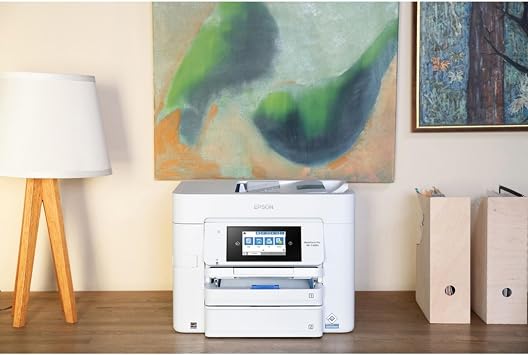
The Epson Workforce WF-C4810 Color Inkjet Multifunction Printer is designed for reliability and reduced downtime in fast-paced environments with the lowest power consumption. It provides high volume printing, duplex solution, and built-in copy, scan and fax features.

Fast
Shipping

Devolução
gratuita*

Embalagem Segura

Produtos 100% Originais

Certificação PCI DSS

Certificação ISO 27001


Note: Step Down Voltage Transformer required for using electronics products of EUA store (110-120). Recommended power converters Compre Agora.


O que se Destaca
High-Quality Output
Delivers vibrant color prints and sharp text using advanced PrecisionCore technology, ensuring professional-quality results for both documents and presentations.
Fast Performance
Prints up to 25 pages per minute, significantly enhancing productivity for busy workplaces and reducing waiting time compared to traditional printers.
Cost-Effective Ink
Utilizes high-capacity ink cartridges that lower printing costs per page, making it an economical choice for small to medium-sized businesses focused on budget-friendly operations.
Detalhes do produto
- Designed for reliability and reduced downtime in fast-paced environments
- Lowest power consumption in its class with PrecisionCore Heat-Free Technology
- Includes a 50-sheet auto document feeder for easy multitasking
- Auto 2-sided printing, copy, scan, and fax for seamless workflow
- Epson ScanSmart allows for easy scanning and editing with a user-friendly interface
- Supports latest wireless connectivity with WPA3 security and convenient setup
| Printer Type | Inkjet |
| Other Special Features of the Product | Auto Document Feeder |
| Printer Output Type | Color |
| Controller Type | Android |
| Print media | Paper (plain) |
| Scanner Type | Sheetfed |
| Compatible Devices | Smartphones |
| Control Method | App |
| Color Pages per Minute | 12 ppm |
| Maximum Media Size | 8.3 x 11.7 inch (21.1 cm) |
| Maximum Sheet Capacity | 50 |
| Printer Connectivity Type | Wireless |
| Hardware Interface | Ethernet |
| Brand | Epson |
| Model Number | WF-C4810 |
| Built-In Media | Information Not Available |
| UPC | 010343968226 |
| Manufacturer | EPSON - SUPERTANK PRINTERS AND INK |
| Unit Count | 1.0 Count |
| Color | Information Not Available |
| Duplex | auto |
| Connectivity Technology | Wireless |
| Printing Technology | Inkjet |
| Special Feature | Auto Document Feeder |
| Printer Output | Color |
| Maximum Print Speed (Color) | 12 ppm |
| Included Components | Information Not Available |
| Item Weight | 37 lbs (16.78 kg) |
What's in the box
Information Not Available
Quem Deverá Comprar?

-
Small Businesses
Ideal for small businesses needing efficient printing, scanning, and copying with high-quality output and low operating costs.
-
Remote Workers
Great for remote workers who require versatile functionality, enabling seamless handling of various document tasks from home.
-
Creative Teams
Suitable for creative teams that demand vivid color prints for presentations and designs, ensuring professional-level quality.

-
Heavy Duty Users
Not suitable for users with extremely high-volume printing needs, as inkjet may require more frequent replacements.
-
Budget-Conscious Consumers
Less ideal for personal users with limited budgets who may find ongoing ink costs burdensome compared to laser alternatives.
-
Mobile Professionals
Not the best choice for frequent travelers needing portable solutions, as this model lacks compact design and easy mobility.
DESCRIÇÃO DO PRODUTO
About This Item
Upgrade your workflow and boost your productivity with the Epson Workforce WF-C4810 Color Inkjet Multifunction Printer. This advanced printer is specifically designed for fast-paced, heavy-workload environments, making it the perfect choice for businesses looking to streamline their operations. Thanks to its PrecisionCore Heat-Free Technology, this printer has the lowest power consumption in its class. Not only does this save you money on energy bills, but it also reduces downtime and ensures uninterrupted printing.
With impressive printing speeds of 25 black/12 color ISO ppm, you can rely on this printer to deliver high-quality, high-volume prints in no time. The WF-C4810 is a complete duplex solution, offering auto 2-sided printing, as well as built-in copy, scan, and fax capabilities. With its 50-sheet Auto Document Feeder, you can quickly and conveniently accomplish a variety of tasks without any hassle. Plus, the large 500-sheet paper capacity allows you to handle large printing jobs without constant paper refills. One of the standout features of this printer is the vivid DURABrite Ultra inks, which ensure professional-quality prints with sharp and vibrant colors.
Whether you're printing documents, marketing materials, or photos, you can trust that your prints will always look impressive. Navigating and controlling the printer is a breeze, thanks to the 4.3-inch color touchscreen. It provides a user-friendly interface for easy navigation and control. Additionally, the Epson Smart Panel App allows for enhanced connectivity and productivity when using your mobile device. Setting up this printer is quick and convenient, thanks to its latest wireless connectivity options.
It supports WPA3, the latest wireless security protocol, ensuring robust authentication and cutting-edge security. Whether you prefer Bluetooth Low Energy (BLE), built-in wireless, Wi-Fi Direct, or Ethernet networking, this printer has got you covered. Don't let a slow and inefficient printer hold you back. Invest in the Epson Workforce WF-C4810 Color Inkjet Multifunction Printer and experience the difference it can make in your business.
Shop now and enjoy the benefits of enhanced productivity, professional-quality prints, and seamless connectivity.
Tem alguma Dúvida? Converse connosco
Perguntas e Respostas dos Clientes
-
pergunta:
What are the main features of the Epson Workforce Pro WF-C4810?
Resposta: The Epson Workforce Pro WF-C4810 is a versatile inkjet multifunction printer that offers printing, scanning, copying, and faxing capabilities. It supports automatic duplex printing and is equipped with a high-capacity ink system, ensuring a lower cost per page. This model is engineered for high productivity, making it suitable for small to medium-sized businesses. With its robust paper handling and connectivity options including Wi-Fi and Ethernet, it seamlessly integrates into any office setup, providing reliable and efficient operation for a range of tasks. -
pergunta:
Can the Epson Workforce Pro WF-C4810 print wirelessly?
Resposta: Yes, the Epson Workforce Pro WF-C4810 supports wireless printing, enabling users to print documents directly from their smartphones, tablets, or laptops via Wi-Fi. This feature enhances convenience in a busy office environment, allowing multiple devices to connect to the printer without the need for cumbersome cables. Users can take advantage of Epson's mobile printing applications to manage print jobs from virtually anywhere, making it perfect for remote work or collaborative projects. -
pergunta:
What type of paper does the Epson Workforce Pro WF-C4810 support?
Resposta: The Epson Workforce Pro WF-C4810 supports various paper types including plain paper, premium glossy photo paper, and recycled paper. It can handle different paper sizes ranging from letter and legal to envelopes and custom sizes. This flexibility makes it ideal for diverse printing needs, whether you are producing professional presentations, marketing materials, or everyday documents. Users can easily switch between paper types, allowing for streamlined workflows in varied printing scenarios. -
pergunta:
What are the printing speeds of the Epson Workforce Pro WF-C4810?
Resposta: The Epson Workforce Pro WF-C4810 offers impressive printing speeds, capable of reaching up to 25 pages per minute for black and color documents. This high-speed performance assists businesses in managing large volumes of work efficiently, significantly reducing time spent on printing tasks. It is especially beneficial for high-demand environments where fast turnaround on print jobs is essential, such as in busy offices or during peak periods. -
pergunta:
Is the Epson Workforce Pro WF-C4810 compatible with third-party ink cartridges?
Resposta: While the Epson Workforce Pro WF-C4810 is designed to work optimally with Epson's genuine ink cartridges, some users opt for third-party cartridges. However, it is important to consider that using non-Epson inks may affect print quality and performance. For best results and to ensure that the printer maintains its efficiency and coloration standards, sticking with original Epson cartridges is recommended. This ensures superior quality in documents and longevity in printer performance. -
pergunta:
Does the Epson Workforce Pro WF-C4810 have a scanner function?
Resposta: Yes, the Epson Workforce Pro WF-C4810 includes a high-quality scanner that supports both color and monochrome scanning. It features an automatic document feeder, allowing users to scan multi-page documents quickly and efficiently. This scanning capability enhances productivity in environments that require frequent document digitization, such as offices needing to archive important paperwork or share information electronically. -
pergunta:
What connectivity options are available on the Epson Workforce Pro WF-C4810?
Resposta: The Epson Workforce Pro WF-C4810 offers a variety of connectivity options. It provides Wi-Fi, Ethernet, and USB connections for versatile integration into any office network. Users can easily connect to their home or office network for seamless printing. Additionally, it supports mobile printing through Apple AirPrint, Google Cloud Print, and other third-party apps, making it a flexible choice for users who value convenience and accessibility. -
pergunta:
What is the print resolution of the Epson Workforce Pro WF-C4810?
Resposta: The Epson Workforce Pro WF-C4810 boasts an impressive print resolution of up to 4800 x 1200 optimized dpi. This high resolution ensures that printed documents, presentations, and images are sharp and vibrant, conveying professionalism and clarity. Such quality is particularly advantageous for creative projects or marketing materials where visual fidelity is critical, allowing businesses to present their work in the best light possible. -
pergunta:
How do I set up the Epson Workforce Pro WF-C4810?
Resposta: Setting up the Epson Workforce Pro WF-C4810 requires following a few straightforward steps. After unboxing the printer, connect it to a power source and turn it on. Install the ink cartridges and load paper into the tray. Follow the on-screen instructions for connecting to Wi-Fi or a wired network. The user manual provides detailed guidance to ensure a smooth setup process. This ease of installation allows you to efficiently start printing without extensive technical knowledge, making it user-friendly for all. -
pergunta:
Where can I buy the Epson Workforce Pro WF-C4810 in Mozambique?
Resposta: You can buy the Epson Workforce Pro WF-C4810 Inkjet Multifunction Printer from Ubuy in Mozambique. Ubuy offers a wide selection of printers, including this highly-rated model, ensuring you have access to quality products for your printing needs. With their reliable service and range of options, Ubuy is a great platform to consider when making your purchase.
Epson Laser Printers WF-C4810 Editorial Review
Nenhuma revisão editorial encontrada
Avaliações e Classificações dos Clientes
7 classificações de clientes
-
5 Estrela
47%
-
4 Estrela
29%
-
3 Estrela
0%
-
2 Estrela
0%
-
1 Estrela
24%
Avaliar este produto
Partilhe as suas ideias com outros clientes
Prós
- High-quality color prints
- Versatile multifunction capabilities
- Relatively fast print speed
- User-friendly interface
- Low noise operation
Contras
- Print quality can vary
Related Categories
Related Brands
Histórico de preços do produto
Informação importante
- Limitações: para produtos expedidos internacionalmente, tenha em atenção que qualquer garantia do fabricante pode não ser válida; opções de serviço do fabricante podem não estar disponíveis; manuais de produtos, instruções e avisos de segurança podem não estar nas línguas do país de destino; os produtos (e materiais que o acompanham) pode não ter sido concebido em conformidade com as normas, especificações e requisitos de rotulagem do país de destino; e os produtos podem não estar em conformidade com a voltagem e outras normas elétricas do país de destino (requerendo assim o uso de um adaptador ou conversor caso seja apropriado). O destinatário é responsável por garantir que o produto pode ser legalmente importado para o país de destino. Quando encomenda à Ubuy ou aos seus afiliados, o destinatário é o importador de registo e deve estar em conformidade com todas as leis e regulamentos do país de destino.
- Nem todos os produtos listados na Ubuy estão à venda, uma vez que a Ubuy é um motor de busca global. Os produtos estão sujeitos a leis de exportação/comércio.
MZN 18347
Encomende já e receba por volta de Sunday, Julho 05
Este artigo não está restrito no meu país. (Clique no link acima se este artigo não estiver restrito no seu país, para que a nossa equipa o analise e permita.)
QTY:
Restam apenas 12 artigos em stock.
Secured transaction
Ubuy works hard to protect your security and privacy. Our advanced payment security system ensures confidentiality by encrypting your information during transmission using AES (Advanced Encryption Standards) and SSL (Secure Socket Layer) protocols. Your payment details are 100% secure as we do not share your payment details with third party sellers.
Os nossos principais Parceiros Logísticos
Entrega internacional mais rápida
Recursos e benefícios
- Fast Paced: Designed for reliability and reduced downtime, the WorkForce Pro WF-C4810 is right at home in fast-paced.
- Lowest Consumption: It has the lowest power consumption in its class, thanks to state-of-the-art PrecisionCore Heat-Free Technology.
- Feeder: 50-sheet auto document feeder to quickly and conveniently accomplish a variety of tasks.
- Multi-Tasking: The WF-C4810 keeps things moving with auto 2-sided printing and built-in copy, scan and fax.
- User Friendly: Epson ScanSmart supports easy scanning and editing with a modern, user-friendly interface.