- Pagina inicial /
- Produtos de Escritório /
- Eletrónica de escritório /
- Printers & Accessories /
- Computer Printers /
- Impressoras de Jato de Tinta para Computadores /
- Ink Tank Printers /
- Canon PIXMA MG3620 Wireless All-In-One Color ...
0 ratings


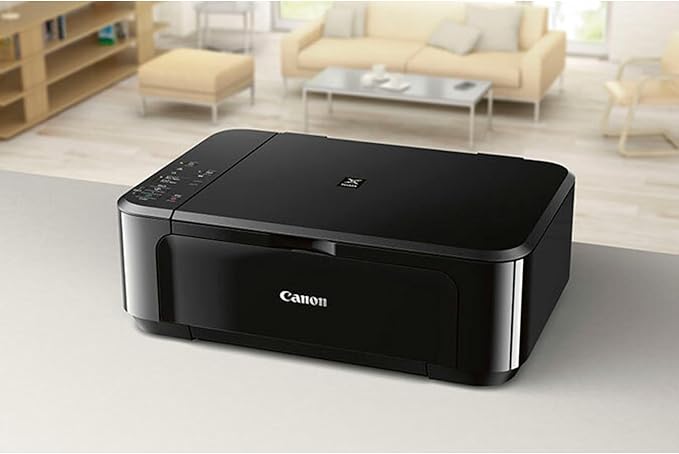



Artigo n.º:
904437
Canon PIXMA MG3620 Wireless All-In-One Color Inkjet Printer with Mobile and Tablet Printing, Red, 17.7 (W) X 12.0 (D) X 6.0 (H)
Artigo n.º:
904437
MZN 9077
Price Details
Excluding Shipping & Custom charges ( Shipping and custom charges will be calculated on checkout )
*All items will import from EUA
Em estoque
 Importado da loja USA
QTY:
Restam apenas 13 artigos em stock.
Encomende já e receba por volta de Quarta-feira, Junho 24
Secured transaction
Ubuy works hard to protect your security and privacy. Our advanced payment security system ensures confidentiality by encrypting your information during transmission using AES (Advanced Encryption Standards) and SSL (Secure Socket Layer) protocols. Your payment details are 100% secure as we do not share your payment details with third party sellers.
Os nossos principais Parceiros Logísticos


Mobile and Tablet Printing with Airprint and Google Cloud Print compatible.

Fast
Shipping

Devolução
gratuita*

Embalagem Segura

Produtos 100% Originais

Certificação PCI DSS

Certificação ISO 27001


Note: Step Down Voltage Transformer required for using electronics products of EUA store (110-120). Recommended power converters Compre Agora.


O que se Destaca
Wireless Printing
Effortlessly print from anywhere using Wi-Fi connectivity. The Canon PIXMA MG3620 allows for easy mobile and tablet printing, ensuring convenience and flexibility for your printing needs.
Compact Design
With its space-saving dimensions of 17.7 x 12.0 x 6.0 inches, this printer fits easily in small spaces, making it perfect for home offices or students in dorm rooms.
High-Quality Prints
Delivering vibrant and sharp color prints, the PIXMA MG3620 enhances photo quality, making it an ideal choice for both everyday documents and impressive photo output.
Detalhes do produto
- Mobile Device Printing: Easily print from your iPhone, iPad, Android or tablet
- Quick and Easy Wireless Setup. Paper Sizes- 4 x 6, 5 x 7, Letter, Legal, U.S. #10 Envelopes. Output Tray Capacity- 100 Sheets Plain Paper -OR- 20 Sheets of 4x6 Photo Paper
- Powerful Printing options: Airprint, Google Cloud Print, NFC, Mopria and Canon Print
- Compact and Space saving design
- Printer Only Bundle Includes: Printer, Manuals & Documents, Setup CD Rom, Setup inks(black and color), and Power Cord
| Printer Type | Inkjet |
| Other Special Features of the Product | Auto-Duplex, Wireless |
| Printer Output Type | Color |
| Item Weight | 11.9 Pounds (5.4 kg) |
| Item Dimensions D x W x H | 12"D x 17.7"W x 6"H (30.5 x 45 x 15.2 cm) |
| Controller Type | Android |
| Print media | Envelopes |
| Scanner Type | Photos or documents |
| Maximum Copy Speed Black and White | 9.9 ppm |
| Compatible Devices | Laptops, PC, Smartphones |
| Ink Color | black, cyan, magenta, yellow |
| Additional Printer Functions | All In One |
| Control Method | App |
| Number of Trays | 1 |
| Processor Count | 1 |
| Resolution | 4800 x 1200 |
| Maximum Media Size | 8.5 x 14 inch (21.6 cm) |
| Maximum Sheet Capacity | 100 |
| Paper Size | 4, 5.5, 8.5, 11, 10 inches (10.2 cm) |
| Output sheet capacity | 100 |
| Printer Connectivity Type | USB |
| Hardware Interface | USB |
| Total Usb Ports | 1 |
| Dual-sided printing | Yes |
| Duplex | Automatic |
| Brand | Canon |
| Model Name | MG3620 |
| Model Number | 0515C002 |
| Built-In Media | Pixma Mg3620 Photo Printer (red) |
| Model Series | MG3000 |
| UPC | 013803256277 |
| Global Trade Identification Number | 00013803256277 |
| Manufacturer | Canon USA Inc. |
| Item Type Name | Inkjet Printer |
| Unit Count | 1.0 Count |
| Color Pages per Minute | 5.7 ppm |
| B&W Pages per Minute | 9.9 ppm |
| Color | Red |
| Color Depth | 48 bpp |
| Maximum print Resolution Color | 4800 x 1200 dpi |
| Maximum Print Resolution Black and White | 4800 x 1200 dpi |
| Wattage | 16 watts |
| Maximum Copy Resolution Color | 4800 x 1200 dpi |
| Maximum Copy Resolution Black and White | 600 x 600 dpi |
| Connectivity Technology | USB |
| Printing Technology | Inkjet |
| Special Feature | Auto-Duplex, Wireless |
| Printer Output | Color |
| Maximum Print Speed (Color) | 5.7 ppm |
| Max Printspeed Monochrome | 9.9 ppm |
What's in the box
Pixma Mg3620 Photo Printer (red)
Quem Deverá Comprar?

-
Home Users
Ideal for casual printing tasks like photos and documents with easy wireless connectivity from various devices.
-
Students
Perfect for printing assignments and study materials directly from smartphones and tablets, providing convenient mobile printing.
-
Small Businesses
A cost-effective all-in-one solution for printing, scanning, and copying, suitable for basic office needs.

-
High Volume Users
Not suitable for users needing high throughput, as it's optimized for light to moderate printing activities.
-
Professional Photographers
While it prints well, it does not provide the high-quality color accuracy required for professional photography prints.
-
Users Needing Speed
The print speed is moderate; those needing rapid print jobs may find it insufficient for their requirements.
DESCRIÇÃO DO PRODUTO
Tem alguma Dúvida? Converse connosco
Perguntas e Respostas dos Clientes
-
pergunta:
What features does the Canon Pixma MG3620 offer?
Resposta: The Canon Pixma MG3620 is equipped with wireless printing, scanning, and copying capabilities, making it an ideal all-in-one solution for home or small office use. It supports mobile and tablet printing via AirPrint, Google Cloud Print, and the Canon PRINT app. This versatility allows users to print directly from their devices without the need for a computer. Additionally, the printer features a compact design that saves space while delivering high-quality color prints, perfect for documents, photos, and more. -
pergunta:
Is the Canon Pixma MG3620 compatible with Windows and Mac operating systems?
Resposta: Yes, the Canon Pixma MG3620 is compatible with both Windows and Mac operating systems. It supports various versions, ensuring that users can easily integrate the printer into their existing setups. Canon also provides drivers and software that can be downloaded from their website, ensuring that any necessary updates are easily accessible. This compatibility allows users to print from desktops, laptops, and various devices, enhancing the printer's usability. -
pergunta:
What type of ink cartridges does the Canon Pixma MG3620 use?
Resposta: The Canon Pixma MG3620 uses Canon's PG-240 and CL-241 ink cartridges. The PG-240 is a black cartridge, while the CL-241 is a color cartridge that includes CMY colors for vibrant photo printing. These cartridges are designed for optimal print quality, ensuring that your documents and images come out sharp and colorful. Additionally, using genuine Canon cartridges guarantees better performance and longer-lasting prints, making them a smart choice for users who prioritize quality. -
pergunta:
Can I print directly from my smartphone or tablet?
Resposta: Yes, the Canon Pixma MG3620 supports direct printing from smartphones and tablets. Users can leverage features like AirPrint for Apple devices or the Canon PRINT app for Android devices. This functionality allows for seamless document and photo printing from anywhere within Wi-Fi range, eliminating the need to transfer files to a computer beforehand. It's particularly useful for users who regularly print on the go, such as students or professionals. -
pergunta:
What is the print speed of the Canon Pixma MG3620?
Resposta: The Canon Pixma MG3620 offers print speeds of up to 9.9 pages per minute (ppm) for black and 5.7 ppm for color prints. While these speeds are sufficient for everyday printing tasks, the actual speeds may vary depending on the complexity of the document being printed. It's ideal for users who need a reliable printer for routine printing tasks like documents, school assignments, or color images, providing efficient performance for both home and small office environments. -
pergunta:
Does the Canon Pixma MG3620 support duplex printing?
Resposta: The Canon Pixma MG3620 does not feature automatic duplex printing, which means users need to manually flip the pages to print on both sides. However, this can be a great way to save on paper usage. Users who print frequently double-sided documents can consider this when planning their printing tasks. Manual duplex printing allows for more control over the print process and can be a cost-effective method for those focused on sustainability. -
pergunta:
How can I set up the Canon Pixma MG3620?
Resposta: Setting up the Canon Pixma MG3620 is straightforward. Start by unboxing the printer and inserting the ink cartridges. Connect the printer to your Wi-Fi network by following the on-screen prompts on the printer's control panel or use the WPS button if your router supports it. Once connected, download the Canon PRINT app on your device to complete the setup process. This user-friendly approach ensures that you can get printing quickly, enhancing convenience and efficiency in your home or office. -
pergunta:
What paper sizes does the Canon Pixma MG3620 support?
Resposta: The Canon Pixma MG3620 supports a range of paper sizes, including letter (8.5 x 11 inches), legal (8.5 x 14 inches), and various photo sizes like 4 x 6 inches and 5 x 7 inches. This flexibility makes it ideal for both standard documents and high-quality photo printing. Users can choose various media types, including glossy photo paper, plain paper, and envelopes, catering to different printing needs, whether for professional documents or personal projects. -
pergunta:
What are the maintenance requirements for the Canon Pixma MG3620?
Resposta: Maintaining the Canon Pixma MG3620 is crucial for optimal performance. Regularly checking and replacing ink cartridges when low is important to ensure print quality. Additionally, cleaning the print head from the printer settings can prevent clogs and maintain high-quality output. Users should also keep the printer and surrounding area free from dust and debris. Scheduling periodic maintenance helps extend the printer's lifespan and keeps it running smoothly for all your printing needs. -
pergunta:
Where can I buy the Canon Pixma MG3620 in Mozambique?
Resposta: You can purchase the Canon Pixma MG3620 Wireless All-in-One Color Inkjet Printer from Ubuy in Mozambique. Ubuy provides a reliable platform for ordering this printer, offering convenience and delivery options tailored to your needs. With Ubuy, you can easily browse, compare features, and make your purchase online, ensuring you get your printer quickly and hassle-free.
Canon Ink Tank Printers 0515C002 Editorial Review


The Canon PIXMA MG3620 Wireless All-In-One Color Inkjet Printer has garnered a mix of positive feedback and cautionary notes from users regarding its performance and overall experience. Many reviewers praise the printer's durability, with one user stating that theirs has lasted nearly nine years while still functioning well. Users appreciate the printer's ease of setup and the quality of prints, particularly for documents and colored images when using the right paper settings. The compact design and attractive red color also receive compliments, making it a visually appealing addition to a home office. The wireless connectivity feature draws mixed responses; while some users successfully connected the printer to their Wi-Fi networks with ease, others opted for a direct connection due to concerns about interference. The Canon app that facilitates mobile printing and scanning is highlighted for its user-friendly interface, significantly improving the scanning experience for many users. However, some users report that the installation of ink cartridges can be somewhat cumbersome compared to previous models. Despite its several positive aspects, the printer is noted to have some drawbacks. Some users have expressed frustrations with paper jams and connectivity issues due to power fluctuations, which can reset the printer's settings. These issues highlight the importance of proper maintenance and care, suggesting that users keep the printer powered on only during use to prolong its lifecycle. In summary, the Canon PIXMA MG3620 is well-regarded for its print quality, affordability, and longevity, but potential buyers should be mindful of its connectivity quirks and the necessity for regular maintenance. **
Avaliações e Classificações dos Clientes
2818 classificações de clientes
-
5 Estrela
62%
-
4 Estrela
12%
-
3 Estrela
7%
-
2 Estrela
5%
-
1 Estrela
14%
Avaliar este produto
Partilhe as suas ideias com outros clientes
Prós
- Durable and long-lasting, with many users reporting years of reliable performance
- Good print quality for both documents and colored images
- Easy to set up and user-friendly app for mobile printing and scanning
- Compact and attractive design
Contras
- Some users report difficulties with wireless connectivity and paper jams
Histórico de preços do produto
Informação importante
- Limitações: para produtos expedidos internacionalmente, tenha em atenção que qualquer garantia do fabricante pode não ser válida; opções de serviço do fabricante podem não estar disponíveis; manuais de produtos, instruções e avisos de segurança podem não estar nas línguas do país de destino; os produtos (e materiais que o acompanham) pode não ter sido concebido em conformidade com as normas, especificações e requisitos de rotulagem do país de destino; e os produtos podem não estar em conformidade com a voltagem e outras normas elétricas do país de destino (requerendo assim o uso de um adaptador ou conversor caso seja apropriado). O destinatário é responsável por garantir que o produto pode ser legalmente importado para o país de destino. Quando encomenda à Ubuy ou aos seus afiliados, o destinatário é o importador de registo e deve estar em conformidade com todas as leis e regulamentos do país de destino.
- Nem todos os produtos listados na Ubuy estão à venda, uma vez que a Ubuy é um motor de busca global. Os produtos estão sujeitos a leis de exportação/comércio.
MZN 9077
Encomende já e receba por volta de Quarta-feira, Junho 24
Este artigo não está restrito no meu país. (Clique no link acima se este artigo não estiver restrito no seu país, para que a nossa equipa o analise e permita.)
QTY:
Restam apenas 13 artigos em stock.
Secured transaction
Ubuy works hard to protect your security and privacy. Our advanced payment security system ensures confidentiality by encrypting your information during transmission using AES (Advanced Encryption Standards) and SSL (Secure Socket Layer) protocols. Your payment details are 100% secure as we do not share your payment details with third party sellers.
Os nossos principais Parceiros Logísticos
Entrega internacional mais rápida
Recursos e benefícios
- Wireless all in one printer with scanner and copier
- Windows/Mac compatibility
- Mobile and Tablet Printing with Airprint and Google Cloud Print compatible
- Auto 2-Sided Printing
- Print speed: 16 color / 9.9 black white
- Connectivity technology: Wi-Fi