- Home Page /
- Electronics /
- Computer Accessories /
- Computer Accessories & Peripherals /
- Keyboards, Mice & Accessories /
- Mice /
- INPHIC 2.4G USB Nano Receiver Wireless Dongle...
0 ratings

Item #:
77406769
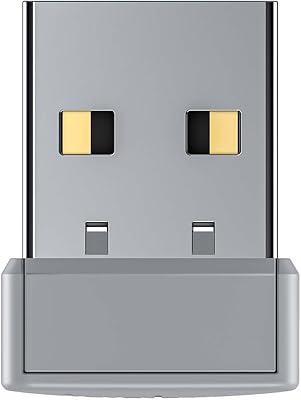
INPHIC 2.4G USB Nano Receiver Wireless Dongle Universal-ONLY Works WIHT INPHIC Mouse
Item #:
77406769
MZN 303593
Price Details
Excluding Shipping & Custom charges ( Shipping and custom charges will be calculated on checkout )
*All items will import from US
0 ratings
Write a review
Out of stock
 Imported from USA store
Secured transaction
Ubuy works hard to protect your security and privacy. Our advanced payment security system ensures confidentiality by encrypting your information during transmission using AES (Advanced Encryption Standards) and SSL (Secure Socket Layer) protocols. Your payment details are 100% secure as we do not share your payment details with third party sellers.
Our Top Logistics Partners


Fast
Shipping

Free
Return*

Secure Packaging

100% Original Products

PCI DSS Compliance

ISO 27001 Certified


Note: Step Down Voltage Transformer required for using electronics products of US store (110-120). Recommended power converters Buy Now.


What Stands Out
Seamless Compatibility
Designed exclusively for INPHIC mice, ensuring flawless connectivity and seamless performance without the need for additional setup or configuration.
Compact Design
The nano receiver's compact size makes it easy to plug into laptops and desktops, minimizing the risk of accidental disconnection and enhancing portability for users on the go.
Reliable Connectivity
Operates on a strong 2.4G wireless frequency, providing a stable and interference-free connection for uninterrupted work and precise control during use.
Product Details
- Compatible with INPHIC wireless mouse
- 2.4G USB nano receiver for wireless connectivity
- Exclusively designed for INPHIC mouse
- Does not work with other brand mice
- Universal wireless mouse dongle
- Compact and convenient design
| Item Weight | 0.2 lbs (90 grams) |
Who Should Buy?

-
Casual Users
Ideal for individuals looking for a seamless wireless connection to use with INPHIC mice for everyday tasks.
-
Travelers
Small and lightweight, this dongle is perfect for on-the-go users who need reliable mouse connectivity while traveling.
-
Budget-Conscious Shoppers
An affordable option for users needing a straightforward solution for connecting their INPHIC mouse without complications.

-
Multi-Device Users
Not suitable for individuals who frequently switch between multiple devices, as it only works with INPHIC mice.
-
Gaming Enthusiasts
Gamers may require high-performance connectivity, which this dongle may not support fully for intensive gaming sessions.
-
Tech-Savvy Users
Users looking for a versatile dongle with extensive compatibility across various brands and types of devices may be disappointed.
Product Description
INPHIC 2.4G USB Nano Receiver Wireless Dongle Universal-ONLY Works WIHT INPHIC Mouse
Have any Query? Chat with us
Customer Questions & Answers
-
Question:
What is the INPHIC 2.4G USB Nano Receiver Wireless Dongle?
Answer: The INPHIC 2.4G USB Nano Receiver is a wireless dongle designed specifically for INPHIC mice. It facilitates a stable and reliable connection between the mouse and your computer or laptop without the clutter of wires. This plug-and-play device allows for seamless use within seconds, making it ideal for both home and professional settings. Typically, users find this dongle beneficial in enhancing their productivity by eliminating the limitations of traditional wired devices, especially in tight or mobile workspaces. -
Question:
How does the 2.4G wireless technology work in this dongle?
Answer: The 2.4G wireless technology utilized in the INPHIC dongle allows for a stronger and more consistent connection by operating within the 2.4GHz frequency range. This technology reduces interference from other devices, ensuring that your mouse responds promptly and accurately. It is especially beneficial in environments cluttered with numerous electronic devices, where Bluetooth connections may falter. Users often appreciate this feature in offices or homes heavy with tech gadgets, where a dependable mouse function is crucial. -
Question:
Is the INPHIC dongle compatible with other brands of mice?
Answer: No, the INPHIC 2.4G USB Nano Receiver is exclusively compatible with INPHIC mice. This is because each manufacturer typically designs their wireless devices to work with proprietary technology. Therefore, other brands may not connect successfully or may lose functionality entirely. If you own an INPHIC mouse, using this dedicated dongle ensures optimal performance and function, making it a perfect match for uninterrupted work or gaming activities. -
Question:
What devices can I use the INPHIC Wireless Dongle with?
Answer: The INPHIC 2.4G USB Nano Receiver can be used with any computer or laptop equipped with a USB port, which includes most modern operating systems like Windows, macOS, and Linux. This versatility allows users across various platforms to enjoy a seamless user experience. Whether for a desktop at the office, a laptop on the go, or a home setup, the dongle provides a reliable connection for various tasks such as gaming, productivity, or casual browsing. -
Question:
Can I use the INPHIC dongle while charging my mouse?
Answer: No, you cannot use the INPHIC dongle while charging your mouse. Typically, this dongle acts as a connection point for wireless mouse functionality, while charging usually requires a direct connection via USB. To maintain uninterrupted performance, it is advisable to charge your mouse when not in use, allowing you to use the dongle for maximum efficiency during work or leisure hours. Users often find this approach beneficial for maintaining battery life while maximizing productivity. -
Question:
What should I do if the connection between the dongle and mouse is lost?
Answer: If you experience a loss of connection between the INPHIC dongle and your mouse, try the following troubleshooting steps: first, ensure that the dongle is securely plugged into the USB port. Next, restart your computer or laptop, as this can often re-establish the connection. Additionally, check to see if the mouse’s battery is charged, as this may cause connectivity issues. Users generally find that these simple steps effectively resolve most connectivity challenges, allowing them to quickly return to their tasks. -
Question:
What is the range of the INPHIC 2.4G Wireless Dongle?
Answer: The INPHIC 2.4G USB Nano Receiver typically offers a reliable connection range of up to 10 meters. This allows for free movement without losing connectivity, making it perfect for presentations or multitasking in larger areas. Users often appreciate this feature when working in spacious offices or home environments, as it provides the flexibility to move around without being tethered to the device. The range can vary based on obstacles like walls, so it is wise to keep that in mind when setting up your workspace. -
Question:
How do I install the INPHIC Wireless Dongle?
Answer: Installing the INPHIC 2.4G USB Nano Receiver is a straightforward process. Simply plug the dongle into an available USB port on your computer or laptop. The device is designed for plug-and-play functionality, eliminating the need for additional software or drivers. Once connected, turn on your INPHIC mouse for automatic recognition and pairing. Users often appreciate this quick setup, allowing them to get right to work without unnecessary delays or technical hurdles, making it ideal for both casual and professional environments. -
Question:
Where can I buy the INPHIC 2.4G USB Nano Receiver Wireless Dongle?
Answer: You can purchase the INPHIC 2.4G USB Nano Receiver Wireless Dongle at Ubuy in Mozambique. Ubuy offers a convenient platform for browsing and selecting this product, ensuring you get authentic items paired with reliable service. Their marketplace features detailed product descriptions and customer reviews, allowing you to make an informed purchase decision. It’s an excellent option for those looking for dependable access to INPHIC products and accessories tailored to meet your needs.
INPHIC Mice Editorial Review
The INPHIC 2.4G USB Nano Receiver Wireless Dongle has received mixed reviews from customers. Some have expressed dissatisfaction, stating that it did not work with their non-INPHIC devices despite the product description indicating otherwise. On the other hand, some users have found it to be a great replacement for the original mouse receiver and have had no issues using it with their INPHIC devices. Despite these mixed opinions, some customers have praised the product for its functionality and convenience. Overall, the reception of the INPHIC 2.4G USB Nano Receiver Wireless Dongle is divided, with some customers facing compatibility issues with non-INPHIC devices while others have found it to be a reliable replacement for their original mouse receiver.
Customer Reviews & Ratings
1 customers ratings
-
5 Star
100%
-
4 Star
0%
-
3 Star
0%
-
2 Star
0%
-
1 Star
0%
Review this product
Share your thoughts with other customers
Pros
- Convenient replacement for original mouse receiver
- Functions well with INPHIC devices
Cons
- Incompatibility with non-INPHIC devices
Product Price History
Important information
- Limitations : For products shipped internationally, please note that any manufacturer warranty may not be valid; manufacturer service options may not be available; product manuals, instructions, and safety warnings may not be in destination country languages; the products (and accompanying materials) may not be designed in accordance with destination country standards, specifications, and labeling requirements; and the products may not conform to destination country voltage and other electrical standards (requiring use of an adapter or converter if appropriate). The recipient is responsible for assuring that the product can be lawfully imported to the destination country. When ordering from Ubuy or its affiliates, the recipient is the importer of record and must comply with all laws and regulations of the destination country.
- Not all the products listed on Ubuy are for sale, as Ubuy is a global search engine. Products are subject to export/trade regulations.
MZN 303593
Currently unavailable.
We don't know when or if this item will be back in stock.
This item is not restrict in my country.(Please click on above link if this item is not restrict in your country, So our team will review and allow.)
Secured transaction
Ubuy works hard to protect your security and privacy. Our advanced payment security system ensures confidentiality by encrypting your information during transmission using AES (Advanced Encryption Standards) and SSL (Secure Socket Layer) protocols. Your payment details are 100% secure as we do not share your payment details with third party sellers.
Our Top Logistics Partners
Fastest cross-border delivery