- Home Page /
- Office Products /
- Office Electronics /
- Scanner & Accessories /
- Computer Scanner /
- Document Scanner /
- Canon CanoScan LiDE400 Document Scanner, Blac...
0 ratings




Item #:
38334649
Canon CanoScan LiDE400 Document Scanner, Black
84% of respondents would recommend this to a friend
Item #:
38334649
MZN 11595
Price Details
Excluding Shipping & Custom charges ( Shipping and custom charges will be calculated on checkout )
*All items will import from US
0 ratings
Write a review
In stock
 Imported from USA store
QTY:
Order now and get it around Wednesday, June 24
Secured transaction
Ubuy works hard to protect your security and privacy. Our advanced payment security system ensures confidentiality by encrypting your information during transmission using AES (Advanced Encryption Standards) and SSL (Secure Socket Layer) protocols. Your payment details are 100% secure as we do not share your payment details with third party sellers.
Our Top Logistics Partners


Fast 8-second scanning helps you quickly work through large tasks

Fast
Shipping

Free
Return*

Secure Packaging

100% Original Products

PCI DSS Compliance

ISO 27001 Certified


Note: Step Down Voltage Transformer required for using electronics products of US store (110-120). Recommended power converters Buy Now.


What Stands Out
High Resolution
The Canon CanoScan LiDE400 offers a stunning 4800 x 4800 dpi optical resolution, ensuring exceptional image clarity and detail for scans of documents and photos.
Compact Design
With a sleek and slim profile, this scanner easily fits on any desk, making it a perfect choice for home offices or small workspaces without sacrificing functionality.
Ease of Use
It features one-touch operation for quick scanning, along with USB power, eliminating the need for bulky power adapters and enhancing convenience for everyday use.
Product Details
- Advanced Z-Lid allows scanning of books and thick media
- Runs off USB power for portability
- Compatible with Windows, Mac, and Linux with ScanGear MP driver installed
- High-speed scanning in as fast as eight seconds
- 4800 x 4800 dpi resolution for detailed photos and images
- Features Auto Scan Mode, PDF button, and Send-to-Cloud functionality
| Scanner Type | Book, Document, Photo |
| Connection Type | USB |
| Resolution | 4800 |
| Wattage | 4.5 watts |
| Color Depth | 24 bits |
| Standard Sheet Capacity | 100 |
| Optical Sensor Technology | CCD |
| Greyscale Depth | 16-bit Internal / 8-bit External |
| Media Type | Photo |
| Light Source Type | LED |
| Minimum System Requirements | Windows 7 |
| Brand | Canon |
| Model Name | CanoScan LIDE 400 |
| UPC | 013803306538 |
| Manufacturer | Canon |
| Item Dimensions D x W x H | 4.92"D x 6.7"W x 1.42"H (12.5 x 17 x 3.6 cm) |
| Item Weight | 4.9 Pounds (2.22 kg) |
| Connectivity Technology | USB |
| Product Dimensions (L x W x H) | 4.92"D x 6.7"W x 1.42"H (12.5 x 17 x 3.6 cm) |
| Package Weight | 10.12 Pound |
Who Should Buy?

-
Home Office Users
Ideal for individuals needing to digitize documents quickly and efficiently from the comfort of their home workspace.
-
Students
Perfect for scanning notes, handouts, and textbooks for easy access and organization in a digital format.
-
Light Volume Businesses
Great for small businesses that occasionally require scanned documents without the need for heavy-duty scanning capabilities.

-
High Volume Scanning
Not suitable for users who require frequent, high-speed scanning due to slower processing and page handling.
-
Professional Photographers
Lacks advanced photo scanning features needed by professionals needing superior color accuracy and resolution.
-
Field Work
Not ideal for on-the-go professionals who need portable scanners with built-in battery and ruggedness.
Product Description
Have any Query? Chat with us
Customer Questions & Answers
-
Question:
What types of documents can I scan with the Canon CanoScan LiDE400?
Answer: The Canon CanoScan LiDE400 is capable of scanning a wide range of documents, including photos, receipts, contracts, and reports. This versatility makes it ideal for both personal and professional use. It supports scanning in various formats such as PDF, JPEG, and TIFF, accommodating diverse needs like archiving important documents or creating high-resolution copies of photographs. -
Question:
Is the Canon CanoScan LiDE400 compatible with Windows and macOS?
Answer: Yes, the Canon CanoScan LiDE400 is compatible with both Windows and macOS operating systems. This compatibility ensures that users can seamlessly integrate the scanner into their existing setups, whether they are using a Windows PC or an Apple Mac. Additionally, Canon provides necessary software to enhance functionality, making it easier to manage scanned documents across various devices. -
Question:
How does the scanning speed of the Canon CanoScan LiDE400 compare to other models?
Answer: The Canon CanoScan LiDE400 offers impressive scanning speeds, completing scans of standard documents in as little as 8 seconds at 300 dpi. This performance is competitive, especially for home office settings where efficiency is crucial. When speed matters, such as during busy work hours or when handling multiple documents, the LiDE400 stands out as a reliable choice. -
Question:
What is the maximum resolution I can achieve with the Canon CanoScan LiDE400?
Answer: The maximum optical resolution for the Canon CanoScan LiDE400 is 4800 x 4800 dpi, enabling high-quality scans with exceptional detail. This high resolution is ideal for scanning photographs or detailed images where clarity is paramount. Whether you are digitizing family photos or creating professional presentations, the LiDE400 ensures that all nuances are preserved. -
Question:
Does the Canon CanoScan LiDE400 have any built-in features for image correction?
Answer: Yes, the Canon CanoScan LiDE400 comes with several built-in features for image correction, such as Auto Document Fix and Auto Scan Mode. Auto Document Fix enhances text readability and image quality automatically, while Auto Scan Mode detects the type of document being scanned for optimal settings. This makes it user-friendly, particularly for those who may not be technology-savvy. -
Question:
Can I scan multiple pages at once with the Canon CanoScan LiDE400?
Answer: While the Canon CanoScan LiDE400 does not support automatic document feeding, it is still possible to scan multiple pages by placing them individually on the flatbed scanner. Ideal for single-page documents, this method works well for users who need to digitize book pages or historical documents, where each page can be carefully scanned with high accuracy. -
Question:
What software is included with the Canon CanoScan LiDE400?
Answer: The Canon CanoScan LiDE400 typically comes with Canon's own software, including MP Navigator EX and IJ Scan Utility. These applications provide tools for managing your scanned images, organizing documents, and adjusting settings for various scanning needs. This software makes it straightforward to edit and save your scans in digital format, enhancing overall productivity. -
Question:
Is the Canon CanoScan LiDE400 portable?
Answer: Absolutely! The Canon CanoScan LiDE400 is designed to be lightweight and compact, which makes it easy to move around or take to different workspaces. Its slim profile fits comfortably on desks with limited space. This portability is invaluable for users who might need to scan documents on the go or in varied locations, such as at home, in the office, or during travel. -
Question:
Can the Canon CanoScan LiDE400 scan in color?
Answer: Yes, the Canon CanoScan LiDE400 supports color scanning capabilities. It’s perfect for capturing vibrant images, such as photographs, artwork, or colorful brochures. This feature allows users to effectively preserve and digitally archive visual content, making it suitable for creative professionals, artists, and anyone who wishes to maintain rich color quality in their scans. -
Question:
Where can I buy Canon CanoScan LiDE400 Document Scanner, Black?
Answer: You can buy the Canon CanoScan LiDE400 Document Scanner, Black from Ubuy. Ubuy offers a convenient purchasing experience with Mozambique reach, allowing customers to easily select and receive their desired products. Whether you are looking for the latest scanner or additional accessories, Ubuy ensures you have a smooth shopping experience.
Canon Document Scanners Editorial Review


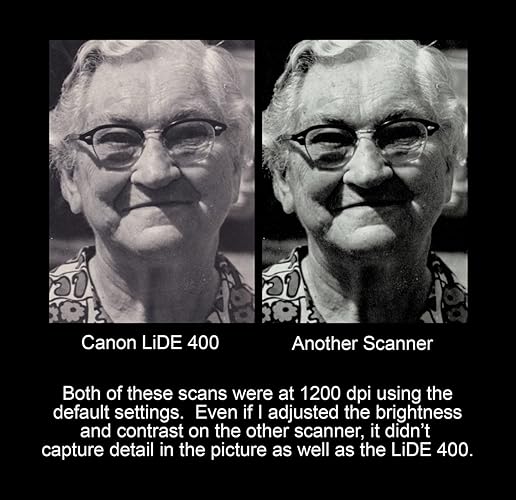
The Canon CanoScan LiDE400 Document Scanner provides good color reproduction and scan quality for the price. It can save images in several formats, including PDF, JPEG, TIFF, or PNG, and has OCR capability. The scanner can also detect multiple photos on the bed and save them as separate files. However, the included software can be difficult to use and may not be suitable for scanning documents. If your primary use case is to digitize photo prints, this scanner is an excellent choice, but for other purposes, the Brother ADS-1200 is a better option.
Customer Reviews & Ratings
889 customers ratings
-
5 Star
56%
-
4 Star
18%
-
3 Star
3%
-
2 Star
1%
-
1 Star
22%
Review this product
Share your thoughts with other customers
Pros
- Provides good color reproduction
- Saves images in multiple formats, e.g., PDF, JPEG, TIFF, or PNG
- Can detect multiple photos on the bed and save them as separate files
Cons
- The included software can be challenging to use
Related Categories
People also bought these Items





Product Price History
Important information
- Limitations : For products shipped internationally, please note that any manufacturer warranty may not be valid; manufacturer service options may not be available; product manuals, instructions, and safety warnings may not be in destination country languages; the products (and accompanying materials) may not be designed in accordance with destination country standards, specifications, and labeling requirements; and the products may not conform to destination country voltage and other electrical standards (requiring use of an adapter or converter if appropriate). The recipient is responsible for assuring that the product can be lawfully imported to the destination country. When ordering from Ubuy or its affiliates, the recipient is the importer of record and must comply with all laws and regulations of the destination country.
- Not all the products listed on Ubuy are for sale, as Ubuy is a global search engine. Products are subject to export/trade regulations.
MZN 11595
Order now and get it around Wednesday, June 24
This item is not restrict in my country.(Please click on above link if this item is not restrict in your country, So our team will review and allow.)
QTY:
Secured transaction
Ubuy works hard to protect your security and privacy. Our advanced payment security system ensures confidentiality by encrypting your information during transmission using AES (Advanced Encryption Standards) and SSL (Secure Socket Layer) protocols. Your payment details are 100% secure as we do not share your payment details with third party sellers.
Our Top Logistics Partners
Fastest cross-border delivery
Features & Benefits
- 4800x4800 dpi resolution
- Color restore and dust removal feature
- Auto Scan Mode for adjustment of scanner settings
- Built-in pdf button allows scanning and saving editable and searchable pdfs
- Send-to-Cloud functionality
- Compatible with Windows, Mac, and Linux OS